First published: Last updated:
The OS and the Kernel
Originally published in Japanese at https://zenn.dev/ymotongpoo/books/go-ebpf-primer/viewer/10-os_kernel.
The picture in the previous chapter had one program in it. A real computer runs many programs at the same time on the same CPU and the same physical memory. They stay out of each other’s memory because the OS, the operating system, gives every program the illusion that it owns the machine.
Processes and virtual memory are what that illusion is made of. The kernel, the core of the OS, holds the boundary, and it manages execution in units called threads. eBPF runs inside the kernel, so the words in this chapter carry straight into Chapter 7.
Executable files and processes
The executable file on disk and the running thing that you get when you launch it are two different things. The running thing is a process. From one executable file you can launch any number of processes.
The OS gives each process a number called a PID, a process ID, to tell them apart. From Go you can read the PID with os.Getpid().
package main

import (
	"fmt"
	"os"
)

func main() {
	x := 42
	fmt.Printf("PID: %d  address of x: %p\n", os.Getpid(), &x)
}
Run the same binary twice, and you get this.
PID: 25  address of x: 0x179411378070
PID: 31  address of x: 0x13456066e070
The program is the same and the variable is the same, and yet both the PID and the address differ between runs. Run the binary twice on your own machine to see it. The Playground runs inside one isolated environment, so its PID stays the same however often you run it. The difference in the addresses is the subject of the next section.
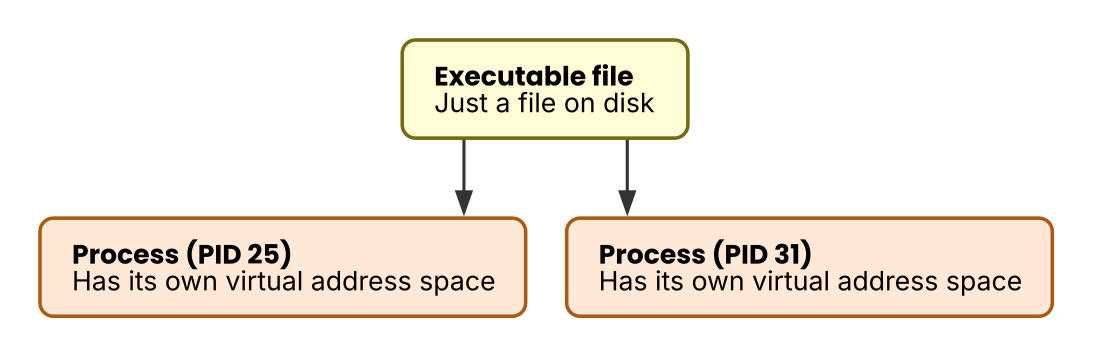 Figure 1: Arrows show the launch relationship. Two processes launched from one executable file have separate PIDs and separate memory, and they run independently of each other.
Virtual memory
The addresses that a process sees are not the slot numbers of physical memory. They are a private sequence of addresses that the kernel prepares for each process. These are virtual addresses, and the kernel keeps a table that maps each virtual address to a place in physical memory.
One result of this mechanism is that the address 0x179411378070 in one process and the same address in another process point at unrelated places. A process cannot touch anything outside its own virtual address space, so it cannot read the memory of a neighboring process by naming an address. Because the spaces are separate, two processes can use the same address value without colliding. The two runs in the previous section printed different addresses for a different reason, which the next note covers.
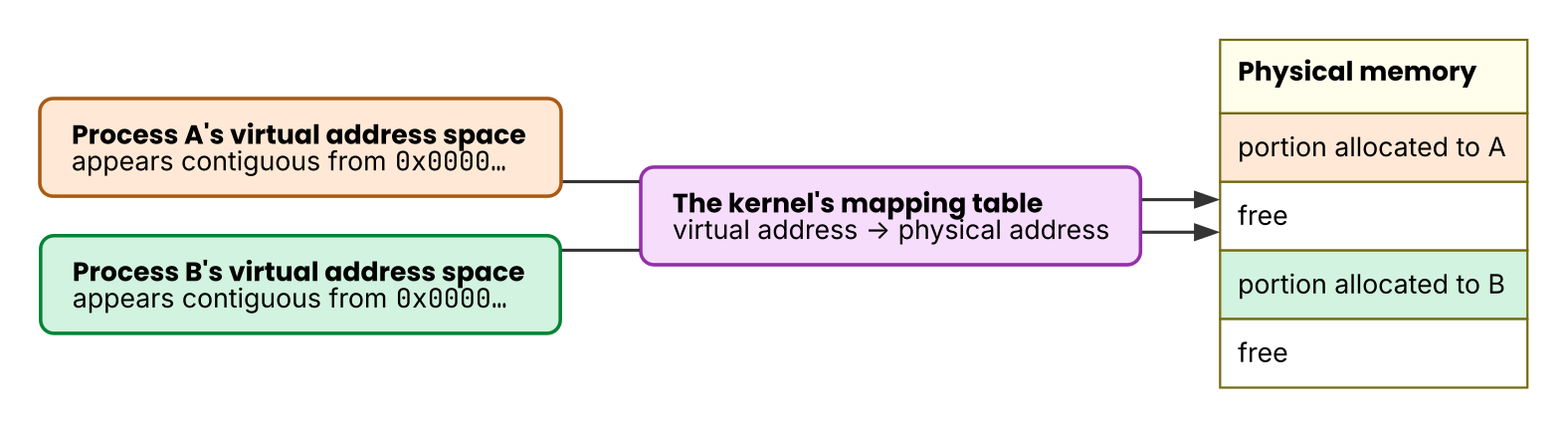 Figure 2: Arrows show correspondence. Each of the two processes sees its own private virtual address space. The table in the kernel maps that space to separate places in physical memory.
randomizedheapbase64 is on by default, and the runtime picks the base address of the heap at random on every launch. The second reason is the main one behind the changing addresses in the experiments in this book. Turn off the kernel’s ASLR with setarch -R and the values still change every time, while building with GOEXPERIMENT=norandomizedheapbase64 narrows the spread. A goroutine’s stack comes from the Go heap as well, so it sees the same effect.The regions of the address space
The virtual address space of a process falls into regions by purpose. The text segment holds the machine code, the data segment holds global variables, and then come the heap and the stack.
The heap and the stack differ in lifetime and in who manages them. The stack grows when a call happens and shrinks when the function returns. You never have to clean it up, but no value can survive the return of the function that put it there. The heap is the region that you allocate on purpose, and a value on it survives the return. Someone has to free it in exchange, or a mechanism such as the garbage collector in Go has to reclaim it. In Go the compiler decides where a value goes, and returning the address of a local variable moves that variable to the heap.
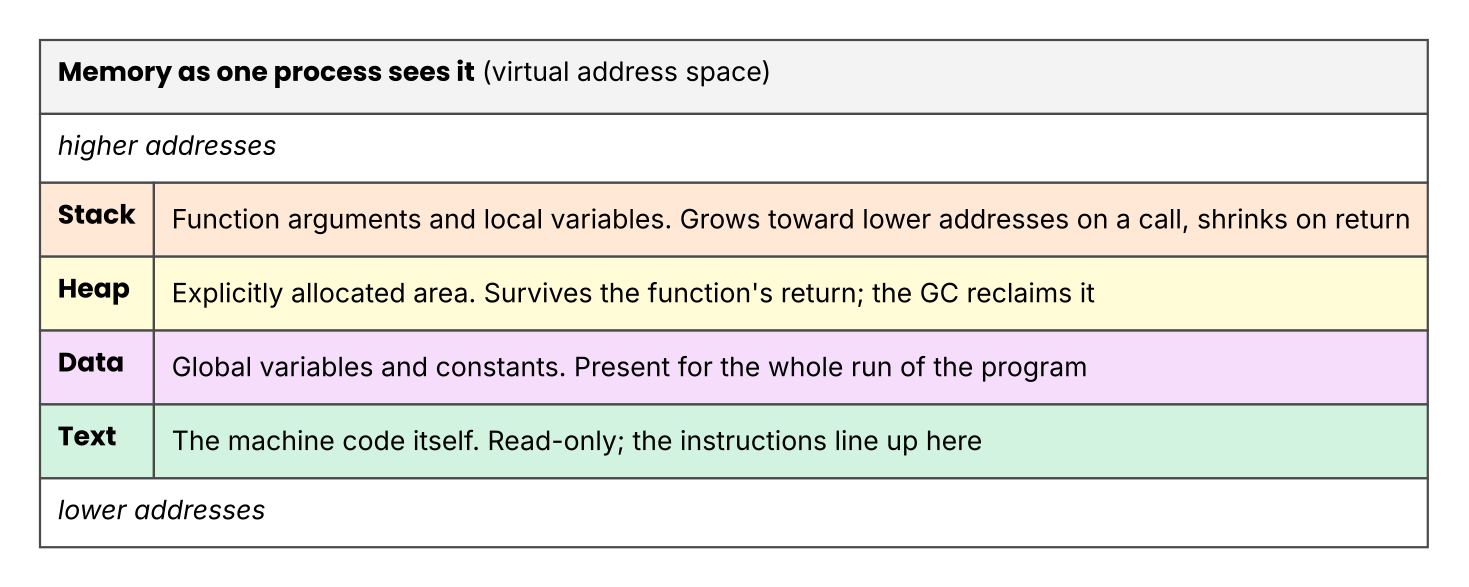 Figure 3: Up and down represent higher and lower addresses. The stack grows from high addresses toward low ones, and the heap from low toward high.
Put this together with the registers from Chapter 2, and you can draw a running process in full. SP points at the top of the stack in this figure, and PC points at the instruction that runs now, inside the text segment.
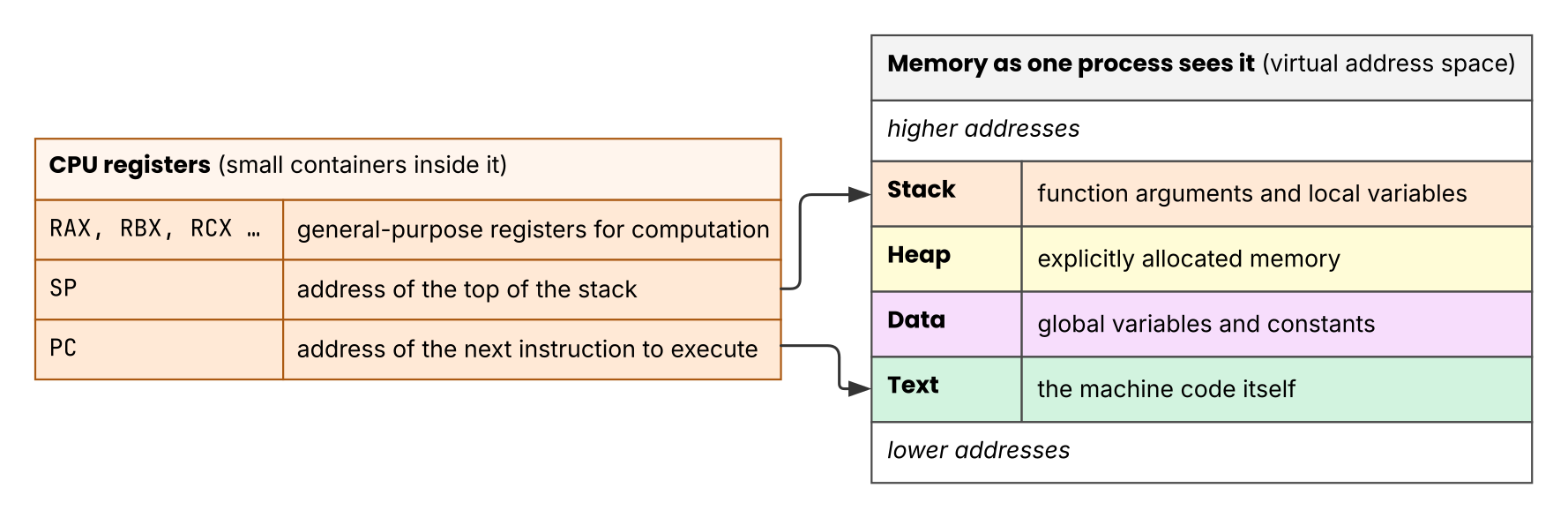 Figure 4: Arrows show where in memory each register points. The table on the right lists the memory regions from this section.
User space and kernel space
The CPU has privilege levels for execution, and application code runs on the restricted side. That side is user space, and the unrestricted side is kernel space. A program in user space cannot give orders directly to the disk or to the network card.
The kernel manages the mapping table for virtual memory and keeps processes isolated from one another. If any program could operate the hardware or that table directly, the isolation would be a request rather than a rule. The OS keeps the illusion intact by allowing only the kernel onto the unrestricted side.
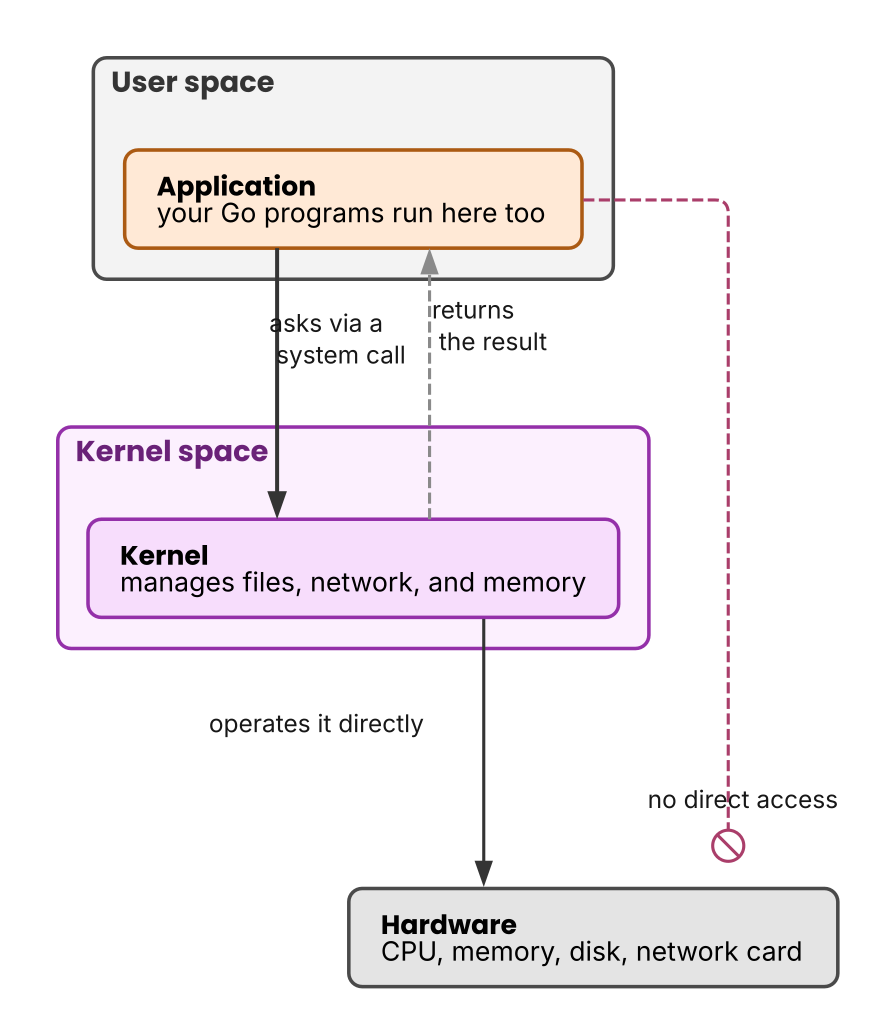 Figure 5: Arrows show the direction of a request. Solid lines are requests from the application to the kernel. Dashed lines are results coming back, and red dashed lines mark what the kernel does not allow.
System calls
A program that wants to touch hardware asks the kernel, and a system call is how it asks. The kernel offers read to read a file, write to write one, and socket to open an endpoint for communication. os.ReadFile in Go calls a system call inside as well. The kernel takes the request, operates the hardware, and returns the result.
A system call looks like a function call, but the inside differs from an ordinary Go call. An ordinary call jumps to the next instruction at the same privilege level. A system call switches to the kernel side with a dedicated instruction, and control returns after the kernel finishes the work. The switch is what makes it cost more than an ordinary function call.
You can watch the handover from outside. Linux has a command called strace that prints the system calls a program issues. The program below reads one file and prints it.
package main

import (
	"fmt"
	"os"
)

func main() {
	data, err := os.ReadFile("/etc/hostname")
	if err != nil {
		panic(err)
	}
	fmt.Print(string(data))
}
Build this and run it under strace. The output covers every file that the Go runtime reads at startup. I narrowed it to openat, read, and write, and kept only the tail.
$ strace -e trace=openat,read,write ./readfile
...
openat(AT_FDCWD, "/etc/hostname", O_RDONLY|O_CLOEXEC) = 4   ← open the file
read(4, "mymachine\n", 512)             = 10                ← read its contents
read(4, "", 502)                        = 0                 ← reached the end
write(1, "mymachine\n", 10)             = 10                ← write to the screen
+++ exited with 0 +++
The Go source calls two functions, os.ReadFile and fmt.Print. Inside those two, three kinds of system call reach the kernel: open, read, and write. The = 4 is a number that the kernel returned, and the later read calls name the file by that number.
eBPF is a program that runs on this kernel side. It puts code that a user wrote inside the kernel, which is dangerous on its own. Chapter 7 covers what the danger is and how eBPF holds it back.
Threads
One process can run several flows of processing at the same time. Each of those flows is a thread.
The threads of one process share the virtual address space. A value on the heap is visible from every thread. The stack alone is different, because each thread holds one dedicated stack of its own. The pushing and popping of function calls is independent for each flow.
The kernel decides which thread runs on the CPU and when, and that assignment is scheduling. The kernel creates threads, gives each one a number, and schedules them, and the thread is where its knowledge stops. That limit becomes a problem later. Go layers a unit of execution of its own, the goroutine, on top of threads, and the kernel cannot see it. Chapter 6 covers this.
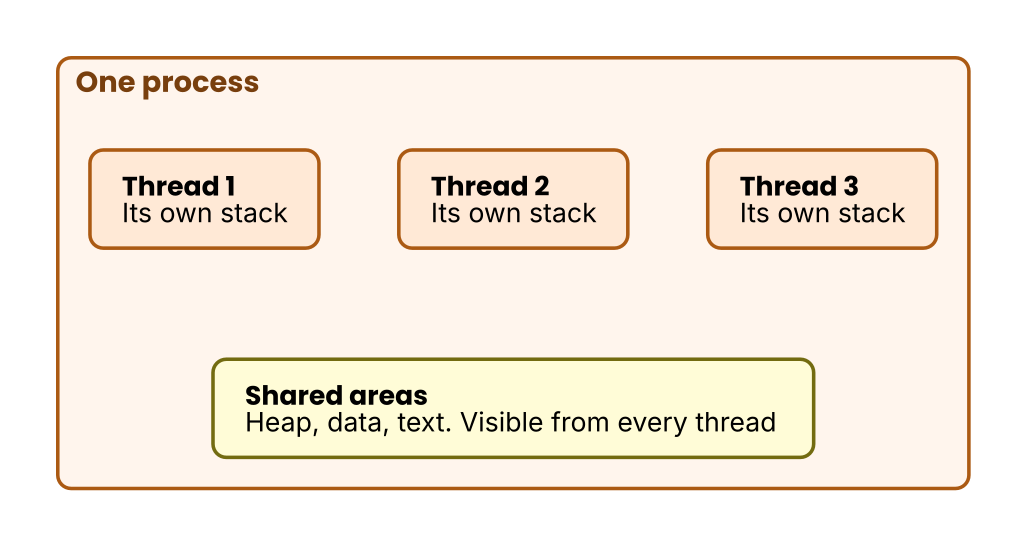 Figure 6: One process holds several threads. Each thread has its own stack, and the threads share the heap and the text segment.
Key points for the hurdles
- A process has a private virtual address space of its own. You cannot read the memory of another process from outside by naming an address, so observing from outside needs machinery of its own.
- The stack is the region that grows and shrinks with function calls. The heap survives the return of a function.
- Each thread has exactly one dedicated stack, and the threads share the heap.
- The unit of execution that the kernel knows stops at the thread. The kernel cannot see past it.
Exercises
- You write a function that returns a pointer to a local variable. What happens if that variable stays on the stack? How does the Go compiler solve it?
- Why does
os.ReadFileneed a system call instead of an ordinary function call? Answer in the words of this chapter.
Answer
- The stack reclaims that region the moment the function returns, and the next function call overwrites it with other values. The returned pointer then points at an invalid place. The Go compiler detects this and puts the variable on the heap, which is called escape analysis.
- Reading from disk is an operation on hardware, and a program in user space is not allowed to perform one. The program has to switch to the unrestricted kernel space and have the kernel do the work for it. A system call is how it asks.