First published: Last updated:
How Computers Run Programs
Originally published in Japanese at https://zenn.dev/ymotongpoo/books/go-ebpf-primer/viewer/05-computer.
This chapter and the four that follow give you the background for the rest of the book. The difficulty of eBPF instrumentation comes from the details of how a program runs. I cover memory, the CPU, registers, and pointers in that order. With those in hand, I then show how Go lays out a struct in memory. Basic Go syntax is all you need to follow the code.
Each section carries a short Go program that runs on any machine with Go installed. You can follow the argument by reading alone. If you run the programs, every experiment in the hurdle chapters becomes an application of something you have already done here.
Memory and addresses
A computer represents all information as bits, and a bit is either 0 or 1. Eight bits together make a byte. One byte holds 256 different values, from 0 to 255.
Memory is a huge shelf of these bytes lined up in a row. Every slot on the shelf carries a serial number, and that number is its address. The CPU reads and writes memory by asking for “the byte at address such-and-such.” Memory has no mechanism for referring to things by name. All it has is numbers.
One byte holds only 0 through 255, so a larger value uses several consecutive bytes. Go’s int occupies 8 consecutive slots on the shelf.
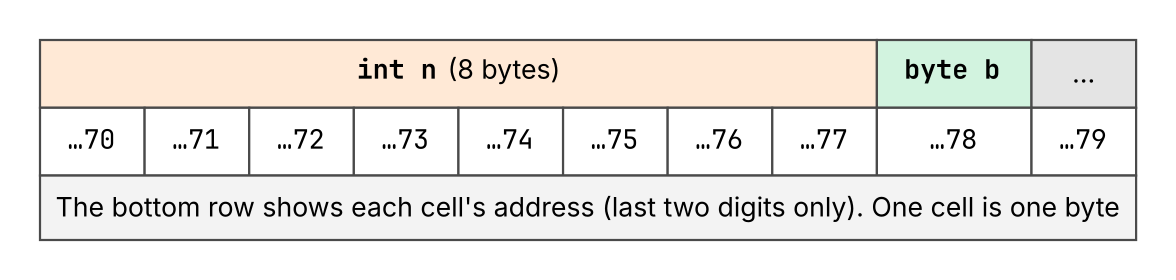 Figure 1: The band at the top is memory, and each cell is one byte. The numbers below the cells are addresses. An 8-byte
 int variable occupies 8 consecutive cells, and the address of that variable means the address of its first cell.
You can check this from Go. unsafe.Sizeof gives the number of bytes that a value occupies, and %p in fmt.Printf prints the address of a variable.
package main

import (
	"fmt"
	"unsafe"
)

func main() {
	var b byte = 200
	var n int = 300
	fmt.Println(unsafe.Sizeof(b), unsafe.Sizeof(n))
	fmt.Printf("address of b: %p\n", &b)
	fmt.Printf("address of n: %p\n", &n)
}
1 8
address of b: 0x3dcdc86d8078
address of n: 0x3dcdc86d8070
byte is 1 byte and int is 8 bytes. A value such as 0x3dcdc86d8078 changes on every run. The individual value does not matter. What matters is that an address is a number.
The notation that starts with 0x is hexadecimal, a way of writing numbers with 16 characters: the digits 0 through 9, then a through f. Two digits cover exactly one byte, which is 256 values, so addresses and memory contents almost always appear in hexadecimal. Numbers such as 0x49e1c0 recur throughout this book, and none of them ask you to do arithmetic. Read each one as an address written in hex.
0x3dcdc86d8078, the last two digits, 78, are the final byte.Executing instructions and the PC
The body of a program is a sequence of instructions. An instruction is the smallest unit of direction that a CPU can act on. Two examples are “add these two values” and “read the value at this address.”
The instructions that a CPU has depend on the design of the CPU, which is its architecture. Each architecture fixes its own instruction set. This book uses amd64. Apple Silicon and AWS Graviton use arm64, and the two instruction sets are different things. The same Go source code yields a different sequence of instructions depending on the architecture that you build it for. CALL and RET, which appear in later chapters, are instructions in this set.
Instructions live in memory, just as data does. The sequence of instructions sits in memory, and each individual instruction has an address. This point runs through the whole book. An operation such as “place a hook on this function” comes down to “do something at this instruction address.”
The job of the CPU is a simple loop. It holds the address of the instruction to execute now. It fetches the instruction from that address, decodes its meaning, and executes it. It then advances to the address of the next instruction and repeats. The place that holds the address of the instruction to execute now is the PC, the program counter.
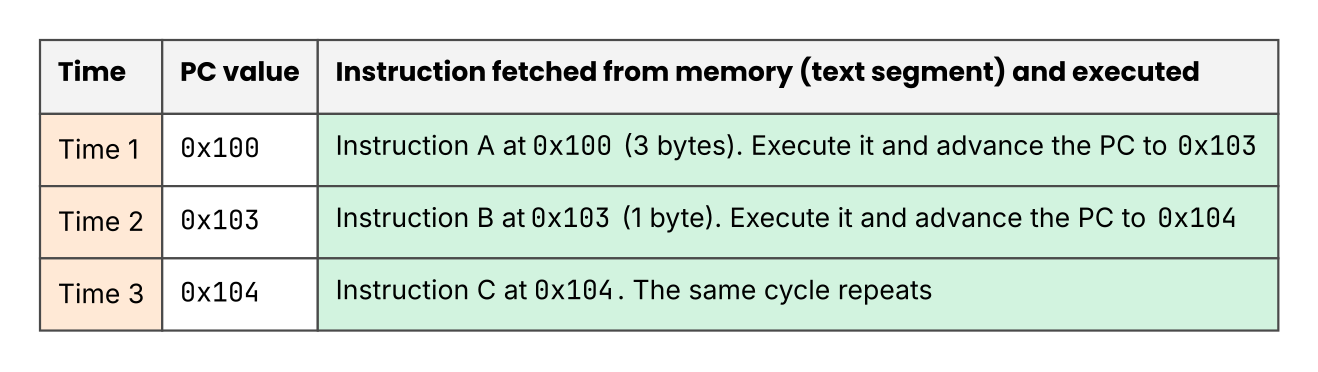 Figure 2: Time flows from top to bottom. The CPU fetches and executes the instruction at the address that the PC points to. The PC then advances to the next instruction. A jump instruction works by rewriting the PC to a different address.
Chapter 4 shows real instructions through disassembly. For now, carry one model forward: instructions sit in memory, and the PC points at the one that runs now.
Registers
The CPU does not compute on a value where it sits in memory. It first loads the value into a small container inside the CPU, computes there, and writes the result back when it needs to. Those containers are registers. The CPU has 16 general-purpose registers for computation, each 64 bits (8 bytes) wide. Registers are orders of magnitude faster than memory, and there are orders of magnitude fewer of them. (The CPU has other register banks, such as the ones for floating-point work, but they do not appear in this book.)
This book uses amd64, the 64-bit x86 family. Its general-purpose registers carry names such as RAX, RBX, and RCX. One of those sixteen has a fixed role: it points at the top of the stack, the region that function calls use (Chapters 3 and 5), and it is called SP. The PC from the previous section sits outside the sixteen. Their official names are RSP and RIP, but I follow the notation that the Go toolchain uses.
Notation differs between tools. CPU manuals and eBPF documents write the 64-bit register as RAX, and the Go tools write the same register as AX. Both spellings appear in the output later in the book, and they name the same register.
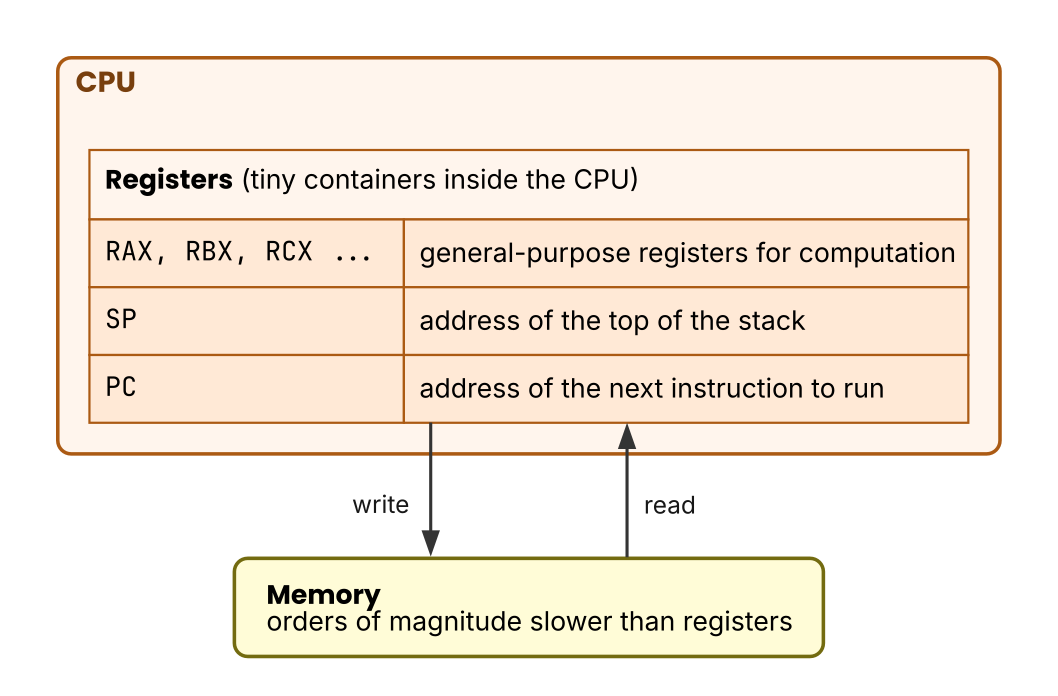 Figure 3: Arrows show the direction that data moves. Computation happens on the registers, and the CPU reads and writes memory only when it needs to.
Hurdle 2 turns on the phrase “pass function arguments in registers.” The caller puts values into registers such as RAX and RBX, and the callee reads them there. The call skips memory, which makes it faster and makes the arguments harder to find from the outside.
Pointers
An address is a number, so you can put it in a variable and carry it around. A variable that holds an address as its value is a pointer.
In Go, &x takes the address of a variable x, and *p reads the value that a pointer p points to. unsafe.Pointer and uintptr go one step further and let you take an address out as a plain integer.
package main

import (
	"fmt"
	"unsafe"
)

func main() {
	x := 42
	p := &x
	fmt.Printf("value of x: %d\n", x)
	fmt.Printf("address of x: %p\n", p)
	fmt.Printf("value p points to: %d\n", *p)
	fmt.Printf("the address as a plain number: %d\n", uintptr(unsafe.Pointer(p)))
}
value of x: 42
address of x: 0x18eef8586008
value p points to: 42
the address as a plain number: 27414647824392
The 27414647824392 on the last line is the same number as the 0x18eef8586008 above it, written in decimal. When you say that a pointer points to something, this number is what you mean.
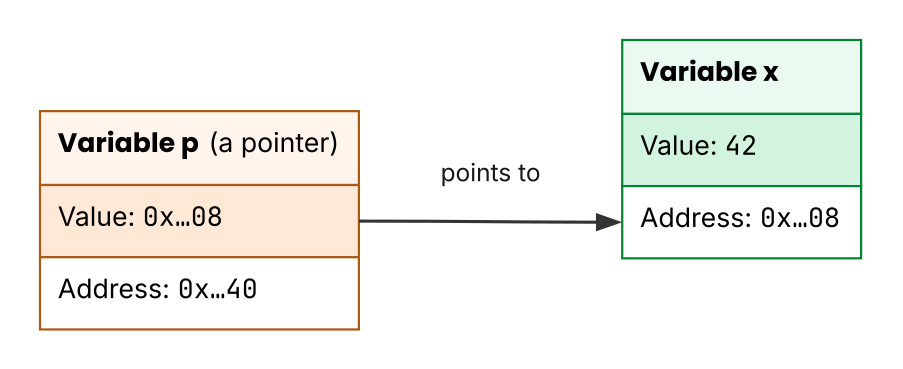 Figure 4: The arrow represents a reference. The variable
 p holds an address, which is a number. When that number matches the address of the cell that holds x, you say that p points to x.
You do not need unsafe.Pointer or uintptr in ordinary application code. This book uses the two only to print addresses as numbers and compare them, which is to say, only to observe. In Hurdle 1, they let you observe the moment when the address of a variable changes as the program runs.
How a struct is laid out in memory
A struct holds its fields in declaration order, but the fields are not always packed tight. An 8-byte value has to start at an address that is a multiple of 8, so the compiler inserts padding between fields.
The number of bytes from the start of the struct to a field is that field’s field offset. In Go, unsafe.Offsetof gives it to you.
package main

import (
	"fmt"
	"unsafe"
)

type record struct {
	flag  bool
	count int64
	id    int32
}

func main() {
	var r record
	fmt.Println("flag :", unsafe.Offsetof(r.flag))
	fmt.Println("count:", unsafe.Offsetof(r.count))
	fmt.Println("id   :", unsafe.Offsetof(r.id))
	fmt.Println("total:", unsafe.Sizeof(r))
}
flag : 0
count: 8
id   : 16
total: 24
flag is 1 byte, and yet count starts at 8 rather than at 1. The compiler has to place the 8-byte int64 at an address that is a multiple of 8, so the 7 bytes in between become padding. More padding follows id and rounds the total size of the struct up to a multiple of 8.
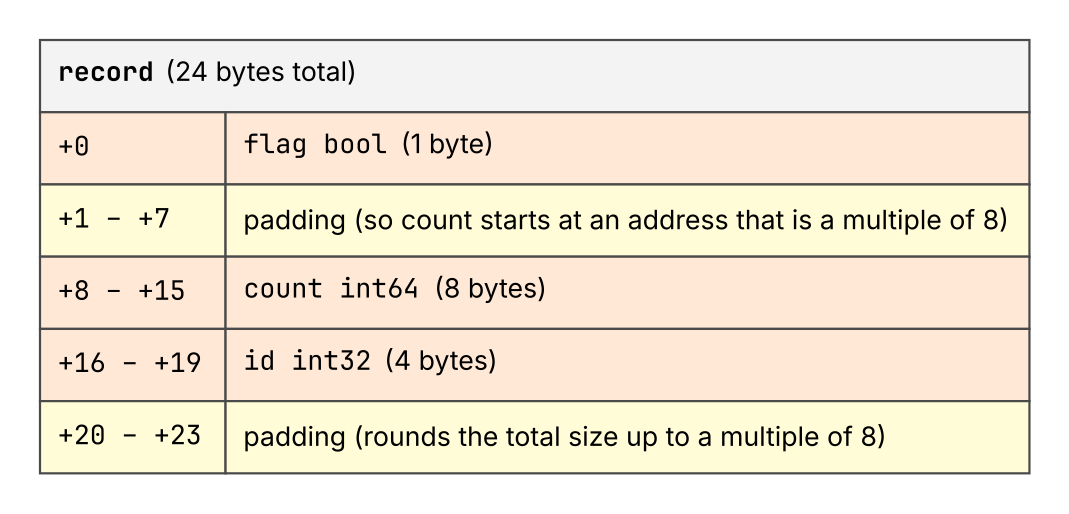 Figure 5: The cells are the 24 bytes of the
 record struct. The padding cells, between the fields and at the end, hold no field’s value.
What matters is that no field name remains on the struct value itself. What sits in memory as those 24 bytes is bytes alone, and no name is written anywhere in them. r.count exists only in the source code. An outside observer that wants the same value has to know the byte offset of the field from the start of the struct.
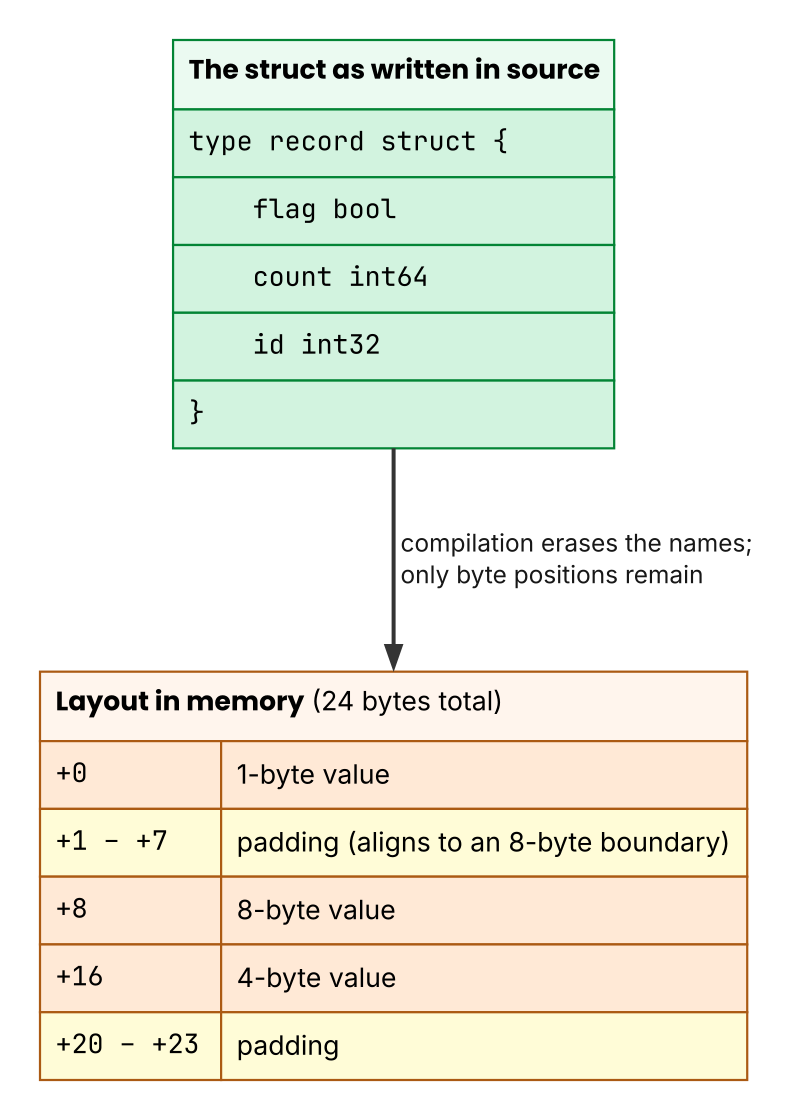 Figure 6: Arrows show the direction of the transformation. The field names in the source on the left do not remain in the struct value on the right. Only byte positions remain.
No name remains on the value side, so why can a debugger still show a name such as r.count? Because it reads DWARF, which Chapter 4 covers. How an external instrumentation tool finds the same field offset is the subject of Hurdle 3.
Key points for the hurdles
- Memory is a row of bytes with addresses, and an address is a number. A pointer holds that number as its value.
- Instructions also sit in memory and have addresses, and the PC points at the position that runs now. A call sometimes passes its arguments in registers.
- No field name remains on the value side of a struct. Only byte positions, which are offsets, do. The mapping from names to positions lives on the side of DWARF and of the type information for reflection.
Exercises
- For
type pair struct { a int32; b int64 }, what areunsafe.Offsetof(p.b)andunsafe.Sizeof(p)? Make a prediction, then check it on your machine. - In the first program of this chapter, swap the order of the declarations of
bandn. What happens to the relationship between the two printed addresses? Run it and see.
Answer
bis 8 bytes, so it goes at an address that is a multiple of 8.Offsetof(p.b)is 8 andSizeof(p)is 16. Four bytes of padding followa.- The concrete address values change from run to run, but the two variables still land at nearby addresses. Which one gets the higher address is up to the layout that the compiler chooses, and it need not match declaration order.