View GitHub Actions and Docker Builds as One Trace in Grafana Cloud
Originally published in Japanese at https://zenn.dev/ymotongpoo/articles/20261028-github-actions-buildkit-otel.
I verified this setup on October 27, 2026, on a GitHub-hosted Ubuntu 24.04 runner with these versions. The only signal that I export is traces.
- Docker Engine 28.0.4
- Buildx v0.29.1
- BuildKit v0.33.1
- OpenTelemetry Collector contrib v0.164.0
In this version, the trace support of the GitHub receiver is alpha. The parent span ID calculation, which I describe below, also depends on the receiver’s implementation.
Introduction
In my previous article, Find the Commit That Slowed Your Docker Build with Grafana Tempo, I traced local builds to find the commit and the Dockerfile step that made a build slower. The next step is CI. The GitHub Actions UI can tell you that the Docker build step is slow. To find what took the time inside that step, you have to open the build logs or records separately. I wanted to follow a single trace from the whole workflow down to each Dockerfile step.
TL;DR
I confirmed that BuildKit can send traces to the Grafana Cloud OTLP endpoint. To connect the build to a CI step, you calculate the ID that the OpenTelemetry Collector GitHub receiver gives that step, before the build starts. Then you pass it to Buildx as TRACEPARENT. A Collector that runs for a short time inside Actions sends the CI spans, after it gets the completed run from the GitHub API. The result is one trace that contains the workflow and both jobs, with the BuildKit spans under the build step of the build job.
Two export paths
In this setup, the build traces and the GitHub Actions traces travel separately. When both sides use the same trace ID and parent span ID, Grafana Cloud shows them as one trace.
On the build side, the sender is BuildKit, which can export traces with OpenTelemetry. BuildKit exports a span for each Dockerfile step. Buildx, the client, forwards its own spans to BuildKit, and BuildKit exports them together.
GitHub Actions has no sender like BuildKit. You can get the records of a workflow run from webhook events or the REST API, but those records are not traces. The OpenTelemetry Collector GitHub receiver converts them into spans. It receives the workflow_run and workflow_job webhook events from GitHub and creates spans for the workflow, its jobs, and their steps. A receiver is a component that runs inside the Collector. So the GitHub Actions spans go through the Collector, and its exporter sends them to Grafana Cloud.
For this test, I chose to fetch and send the CI events entirely inside Actions1. When the workflow completes, it triggers a separate workflow, and that workflow runs a Collector on its runner for a short time. A helper script gets the completed run from the GitHub API and builds events in the same format as the webhooks. Then it passes them to the GitHub receiver on the same runner. When you test only the export from BuildKit, you do not need this Collector.
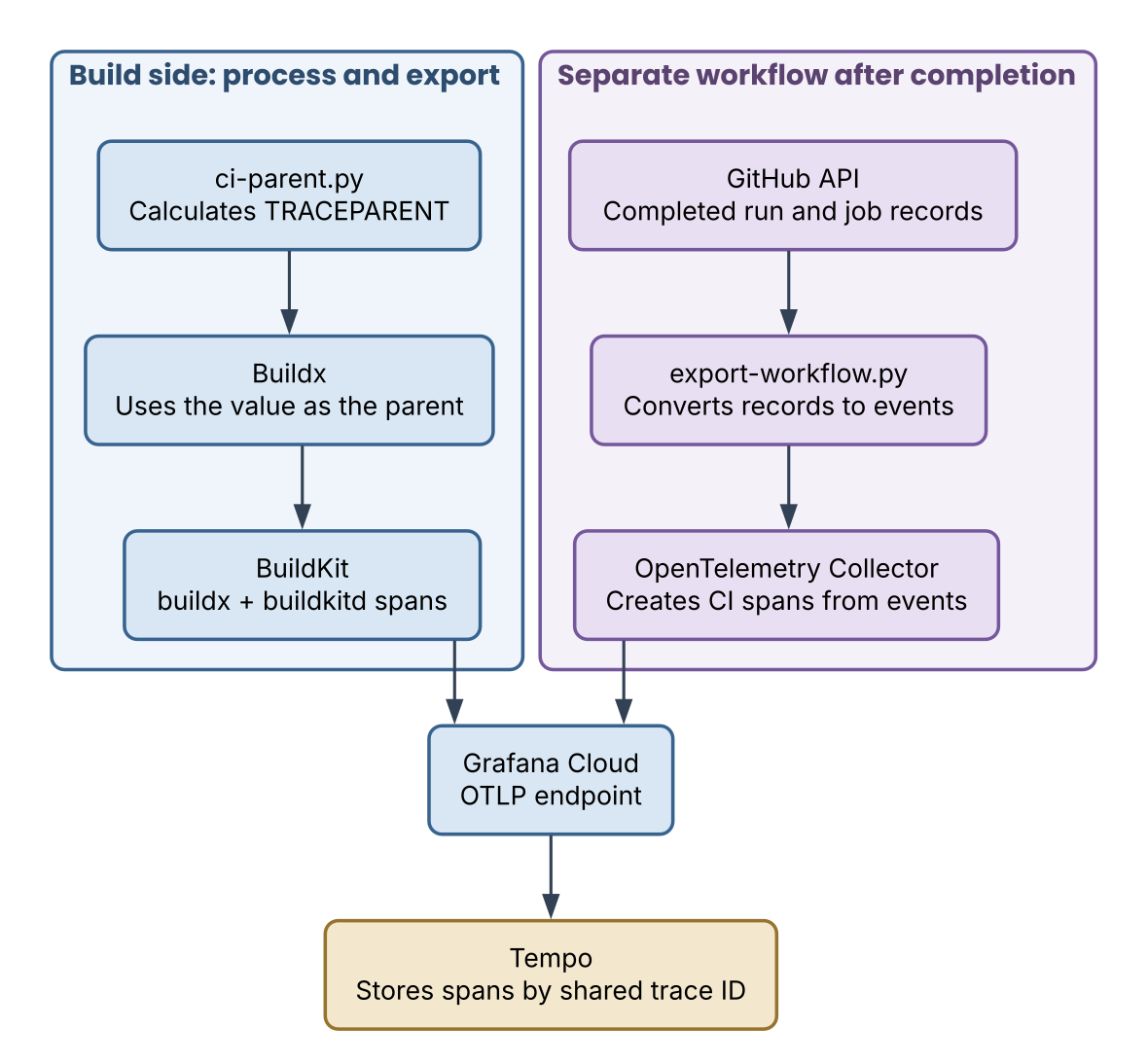 Figure 1: Arrows show how data moves. On the left, the calculated TRACEPARENT goes to Buildx. The right side is the separate workflow that runs after completion. A helper script converts the GitHub API records into events and passes them to the OpenTelemetry Collector. The GitHub receiver inside the Collector creates the CI spans and the Collector sends them.
The test subject is a small BusyBox 1.37.0 image. The Dockerfile copies a file and writes it to another file with RUN. I also ran the built image and checked its output. The complete set of files for this test is public.
From BuildKit to Grafana Cloud
First, I checked the export from BuildKit alone, without an Actions parent span. Get the connection details from Grafana Cloud and register them as Actions secrets in the repository, with these names:
| Secret | Value |
|---|---|
GRAFANA_CLOUD_OTLP_ENDPOINT | The OTLP base URL, up to and including /otlp |
GRAFANA_CLOUD_OTLP_HEADERS | The Authorization=... header from the Grafana Cloud connection page |
The Actions step passes these secrets to the environment variables OTEL_EXPORTER_OTLP_ENDPOINT and OTEL_EXPORTER_OTLP_HEADERS. This is scripts/setup-builder.sh:
#!/usr/bin/env bash
set -euo pipefail
: "${OTEL_EXPORTER_OTLP_ENDPOINT:?Missing OTLP endpoint}"
: "${OTEL_EXPORTER_OTLP_HEADERS:?Missing OTLP authentication headers}"
docker buildx create --name ci-otel --driver docker-container \
  --driver-opt image=moby/buildkit:v0.33.1 \
  --driver-opt env.OTEL_TRACES_EXPORTER=otlp \
  --driver-opt env.OTEL_EXPORTER_OTLP_TRACES_PROTOCOL=http/protobuf \
  --driver-opt "env.OTEL_EXPORTER_OTLP_TRACES_ENDPOINT=${OTEL_EXPORTER_OTLP_ENDPOINT%/}/v1/traces" \
  --driver-opt "env.OTEL_EXPORTER_OTLP_TRACES_HEADERS=${OTEL_EXPORTER_OTLP_HEADERS}" \
  --bootstrap >/dev/null
With the docker-container driver, BuildKit runs in its own container. So you pass the BuildKit OTLP settings to that container as environment variables with --driver-opt env.…. The protocol is http/protobuf, which means OTLP over HTTP. The endpoint for traces is the base URL with /v1/traces at the end.
When I ran docker buildx build --builder ci-otel --load … with this builder, spans from both Buildx and BuildKit arrived in Grafana Cloud. The baseline run produced a trace of 87 spans with build . as the root. The image build and the run test also passed.
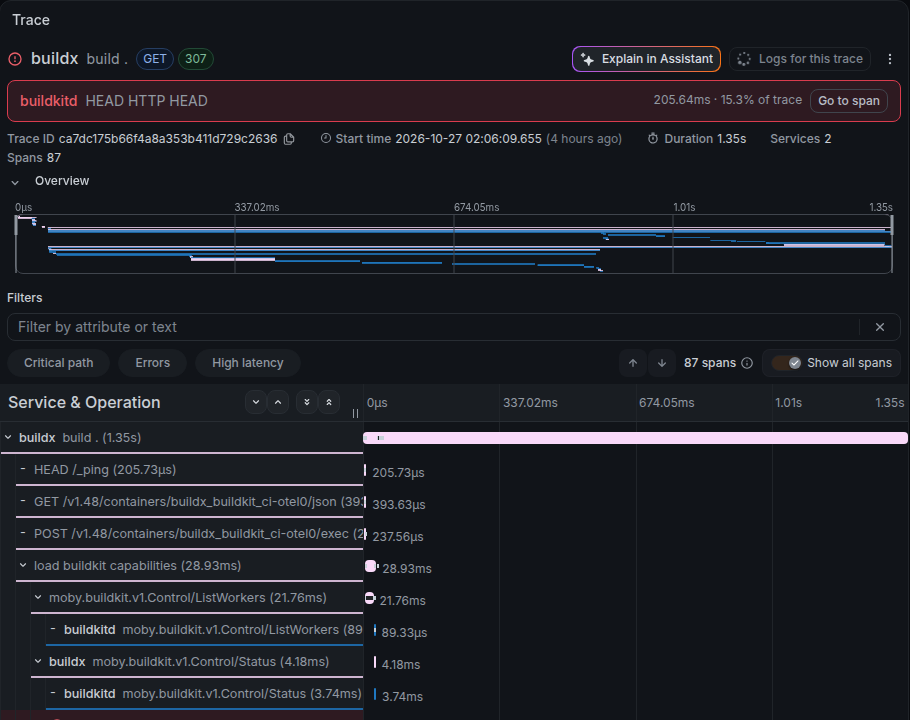 Figure 2: The baseline trace in Grafana Cloud. It contains 87 spans from Buildx and BuildKit2.
Make the Actions step the parent
So far, the root of the trace is build .. To make the GitHub Actions build step its parent, set the environment variable TRACEPARENT on the step that runs Buildx. Buildx reads the value in its code that loads trace context from the environment. Then it makes build . a child of that parent. TRACEPARENT holds the trace ID to join and the span ID of the parent step.
However, the parent step’s span does not exist yet when the build runs. The CI spans come into existence only after the workflow completes. You can still set the parent ID because the GitHub receiver does not generate random trace IDs and span IDs. It calculates them with fixed rules from the run ID and the job ID. If you apply the same rules before the build, you get the same ID that the step span has when it arrives later.
The helper script scripts/ci-parent.py calculates the IDs from the run ID, the run attempt, and the job ID. It uses the same rules as the receiver’s ID generation code3. This is the calculation:
trace_id = hashlib.sha256(f"{run}{attempt}t".encode()).hexdigest()[:32]
step_id = hashlib.sha256(f"{job_id}-Build Docker image-s".encode()).hexdigest()[16:32]
traceparent = f"00-{trace_id}-{step_id}-01"
The TRACEPARENT value has the format 00-<trace ID>-<parent span ID>-01, the same as the traceparent header in W3C Trace Context. The script writes this value to GITHUB_OUTPUT.
The workflow passes the script output only to the build step. This is the relevant part of build.yml:
      - name: Calculate build step parent
        id: build_context
        env:
          GH_TOKEN: ${{ github.token }}
        run: python3 scripts/ci-parent.py
      - name: Build Docker image
        env:
          TRACEPARENT: ${{ steps.build_context.outputs.traceparent }}
          OTEL_RESOURCE_ATTRIBUTES: vcs.ref.head.revision=${{ github.sha }},ci.run.id=${{ github.run_id }},ci.run.attempt=${{ github.run_attempt }},ci.repository=${{ github.repository }},experiment.mode=linked
        run: docker buildx build --builder ci-otel --load --tag buildkit-otel-spike:ci .
The step span ID depends on the job ID and the step name. So the step name must match Build Docker image, the name that the script uses in its calculation. Also keep step names unique within a job. If a job has two steps with the same name, the receiver gives both of them the same span ID.
OTEL_RESOURCE_ATTRIBUTES adds the run ID and the commit for search. Only the Buildx spans get these attributes. The BuildKit spans do not.
Export the CI spans
When the build step finishes, the workflow is still running. The CI spans come from an export workflow that starts on workflow_run with the completed type.
The export workflow passes the run ID and the run attempt from the completion event to the helper script as environment variables:
          OBSERVED_RUN_ID: ${{ github.event.workflow_run.id }}
          OBSERVED_RUN_ATTEMPT: ${{ github.event.workflow_run.run_attempt }}
The run attempt makes the script read the jobs of the attempt in the event. Without it, the script could read a newer attempt that exists when it calls the API. The helper script gets the jobs and steps of that attempt from the GitHub API. It builds events in the same format as the webhooks and POSTs them to the Collector on the runner. You can see the conversion in scripts/export-workflow.py.
This is collector.yaml4:
receivers:
  github:
    webhook:
      endpoint: 0.0.0.0:19418
      path: /events
      health_path: /health
      service_name: github-actions
    scrapers:
      scraper:
        github_org: ymotongpoo
processors:
  batch:
    timeout: 1s
exporters:
  otlp_http/cloud:
    endpoint: ${env:OTEL_EXPORTER_OTLP_ENDPOINT}
    headers:
      Authorization: ${env:GRAFANA_AUTHORIZATION}
    timeout: 10s
    sending_queue:
      enabled: false
    retry_on_failure:
      enabled: false
service:
  telemetry:
    logs:
      encoding: json
  pipelines:
    traces:
      receivers: [github]
      processors: [batch]
      exporters: [otlp_http/cloud]
The exporter endpoint is the base URL as it is. The otlp_http exporter appends /v1/traces itself, unlike BuildKit, which needs the full URL for traces. For the authentication header, the script takes the value after Authorization= from the same secret that BuildKit uses.
This Collector is a test configuration that starts and stops for each export. It has the sending queue and retries turned off5.
To try it yourself, register the two secrets and put both the build workflow and the export workflow on the default branch. Then run BuildKit linked trace manually and wait for both the build and Export completed workflow trace to complete. The API calls use GITHUB_TOKEN with the contents: read and actions: read permissions. You do not need a GitHub App or a personal access token.
The result: one trace
The build run and the CI span export both succeeded. The whole workflow and the inside of the build are now one trace.
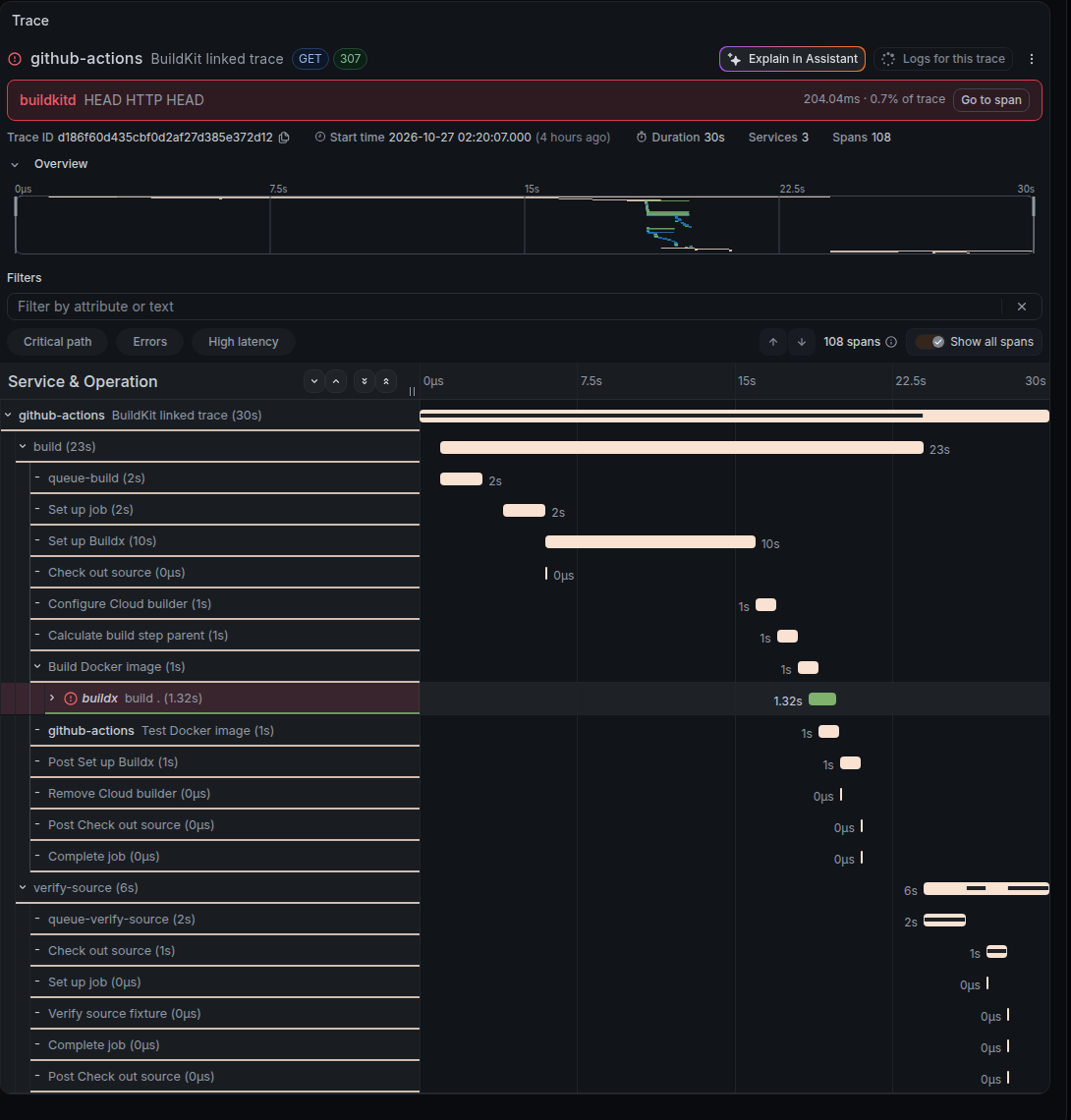 Figure 3: The workflow, both jobs, and every step of the same run are one trace. build . sits under Build Docker image. The inside of the build is collapsed.
This is the breakdown by service:
service.name | Spans | What the spans record |
|---|---|---|
github-actions | 21 | The workflow, jobs, queue time, and steps |
buildx | 33 | Work in the build client |
buildkitd | 54 | The build daemon and the Dockerfile steps |
| Total | 108 | Spans with the same trace ID |
Both jobs connect to the same root: build, and verify-source, which runs on another runner after build completes. Without the CI queue time and the build details, the hierarchy looks like this:
BuildKit linked trace
├── build
│   └── Build Docker image
│       └── build .
│           └── …
│               └── [4/4] RUN cat message.txt > result.txt
└── verify-source
    └── Verify source fixture
The parent ID of build . matched the span ID of Build Docker image. All 108 spans that I retrieved connected to the root of the same workflow6.
In Grafana Explore, select the Tempo data source, narrow the time range to the run, and search with this TraceQL query. ci.run.id is the attribute that OTEL_RESOURCE_ATTRIBUTES added to the Buildx spans.
{ resource.ci.run.id = "40437818776" && name = "build ." }
In the previous article, I selected only root spans (span:parentID = "") to aggregate build durations. In this setup, build . has an Actions parent, so that condition does not select it. To select both local builds and CI builds, use { resource.service.name = "buildx" && name = "build ." }. I confirmed that the search results for this condition include both the baseline trace and the CI trace.
The CI spans arrive only after the export workflow completes. Open the trace after both workflows complete7.
An example with Grafana’s shared actions
Grafana’s CI builds and pushes Docker images with a shared action. Grafana Labs publishes the workflows and actions that its repositories use in grafana/shared-workflows. One of them is docker-build-push-image. This action authenticates to Grafana’s registries, Google Artifact Registry and Docker Hub. Then it builds and pushes the image with docker/build-push-action.
docker-build-push-image has a builder input for the name of the builder to use. If you leave it empty, the action creates a new builder. If you set it, the action builds with that builder. The builder’s settings decide where BuildKit sends traces. So if you pass the ci-otel builder from setup-builder.sh to this input, the shared action sends build traces to Grafana Cloud. To connect them to an Actions step, you also need to pass TRACEPARENT to the step that calls the action. I have not tried this combination yet. Next, I want to check whether a workflow that uses the shared action also produces one trace.
What I verified
I verified the export from BuildKit to Grafana Cloud and the link between the build internals and a two-job workflow. The ID rules, however, are not part of a common OpenTelemetry specification. They are the implementation of GitHub receiver v0.164.0. Before you change the Collector version or a feature gate of the receiver, plan to check the result again. In the retrieved trace, build . must still connect to its parent step.
The CI timestamps come from the GitHub API, which records them in whole seconds. So even when the parent and child connect correctly, a BuildKit span can extend slightly outside the time range of its parent. In this run, build . ended about 0.84 seconds after its parent, Build Docker image.
I tested only manual runs in a trusted repository. I did not test matrix builds, reusable workflows, pull requests from forks, real re-runs, or cache reuse across runs8.
Conclusion
One trace now runs from a GitHub Actions workflow and its steps down to the Dockerfile step or registry call that took the time. To bring this into your own CI, start by checking the export from BuildKit alone. Then add the CI parent span when you need it.
The GitHub receiver is designed to receive webhooks from GitHub in a Collector that runs all the time. If you want to record your organization’s CI continuously, that setup fits better. An always-on Collector can also turn on the sending queue and retries, so that it can resend spans that failed to reach Grafana Cloud. However, to receive webhooks from GitHub, you need to set up and run an endpoint that the internet can reach. I wanted to test without that preparation, so I kept everything inside Actions. ↩︎
The red
HEAD HTTP HEADerror at the top of the figure is a 401 authentication challenge. The Docker Registry token authentication returns it first. In this run, the retry after getting a token returned 200, and the build succeeded. ↩︎To get the numeric job ID, the script lists the jobs of the current run with the GitHub API. Then it takes the ID of the job whose name matches
GITHUB_JOB. If you change a job’s display name or use a matrix, you need another way to identify the job. ↩︎In v0.164.0, the GitHub receiver requires at least one entry in
scrapers, even when you use only traces. The pipeline has only traces, so the receiver does not collect metrics withgithub_org. ↩︎The Collector sends spans through the batch processor. So an HTTP 200 from the receiver does not prove that the export to Grafana Cloud succeeded. After the Collector stops, the helper script reads its logs in JSON format. If a
levelshows an error, the script treats the export as failed. ↩︎The verification script and the verification record are public. In the 108 spans that I retrieved, every span ID was unique, there was one root, and no span had a missing parent. This check cannot tell whether every span that the workflows sent reached Grafana Cloud. ↩︎
In the first Tempo search result, the service name of the root showed
<root span not yet received>. When I later retrieved the trace by its ID, all 108 spans, including the CI spans, were there. ↩︎The export workflow runs the helper script from the commit of the original run. If you extend this setup to runs that start from external pull requests, read GitHub’s notes on
workflow_runpermissions and risks first. ↩︎