Find the Commit That Slowed Your Docker Build with Grafana Tempo
Originally published in Japanese at https://zenn.dev/ymotongpoo/articles/20261027-buildkit-traces-tempo.
I verified this setup on October 20, 2026, with these versions:
- Docker Engine 29.0.0 and buildx v0.29.1 on Ubuntu 26.04.1
- BuildKit v0.33.1, with the builder image pinned to
moby/buildkit:v0.33.1 - grafana/otel-lgtm 0.37.0, which includes Grafana 13.2.3 and Tempo 3.1.0
- mcp-grafana 2.0.2
- Claude Code 2.1.303
- gcx 0.3.0
The commands below use the default otel-lgtm ports in place of the port numbers that I used locally.
Introduction
I work as a Developer Advocate at Grafana Labs.
I will speak at Grafana & Friends Singapore x Docker in Singapore on November 3, 2026. Since Docker co-hosts the event, I chose a topic that I wanted to cover for some time: Docker build traces. Docker can display these traces itself, but storing them in Grafana Tempo lets you investigate across builds. This article covers the setup and what happened when I asked AI tools to investigate those traces.
TL;DR
BuildKit, which runs Docker builds, produces OpenTelemetry traces for each build. You can open them in Jaeger UI with docker buildx history trace, which is enough to investigate a single build. By default, BuildKit keeps the latest 50 history records and deletes older records only if they exceed 48 hours. Send the same traces to Grafana Tempo with commit IDs, and you can graph build durations to find the commit where they increased. A coding agent or Grafana Assistant can read those traces to identify the commit and the step that became slower.
The traces that BuildKit produces
docker build uses the buildx CLI plugin and the BuildKit daemon, which executes the build. BuildKit has built-in OpenTelemetry tracing, with spans for individual Dockerfile steps. You do not need to add instrumentation.
Docker’s official documentation describes only the Jaeger setup, which uses the JAEGER_TRACE environment variable. The BuildKit README also documents OTLP export. It uses OTEL_TRACES_EXPORTER=otlp and OTEL_EXPORTER_OTLP_TRACES_ENDPOINT, the variables that I use below to send traces to Tempo.
BuildKit records traces in its build history even when you do not export them. The docker buildx history trace command retrieves a trace from that history and opens a temporary Jaeger UI1.
docker buildx history trace --builder gf-demo --addr 127.0.0.1:16686
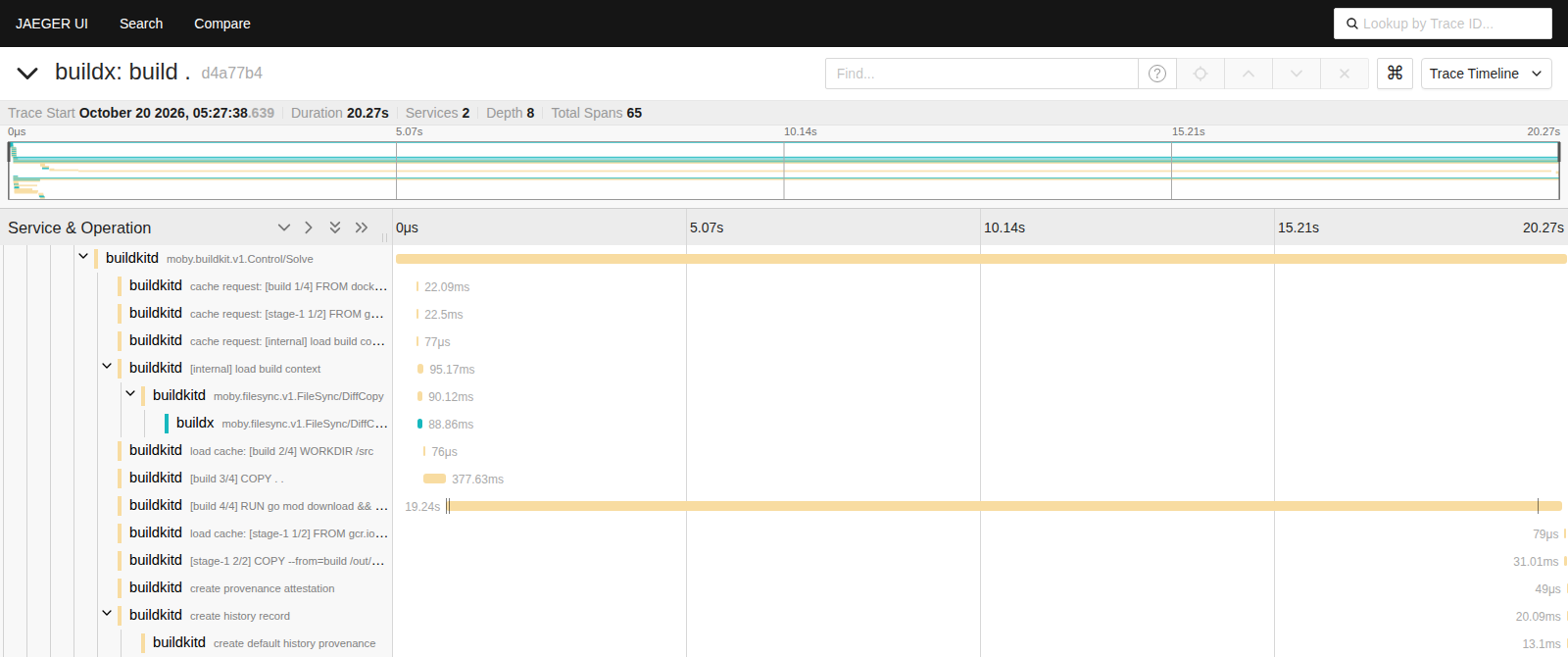 Jaeger UI opened with
 docker buildx history trace. The top shows the trace overview; the bottom shows a crop of the Dockerfile step spans.
The [build 4/4] RUN go mod download && go build step takes 19.24 seconds out of the total 20.27 seconds. This view alone tells you which step to investigate when a build feels slow.
Send traces to Tempo
To send the same traces to Grafana Tempo, pass two environment variables when you create the buildx builder. I used grafana/otel-lgtm as the destination. This container bundles Grafana, Tempo, Prometheus, and the OpenTelemetry Collector. The builder sends traces to its OTLP port.
docker run -d --name lgtm -p 3000:3000 -p 4317:4317 -p 4318:4318 grafana/otel-lgtm:0.37.0

docker buildx create --name gf-demo --driver docker-container \
  --driver-opt image=moby/buildkit:v0.33.1 \
  --driver-opt network=host \
  --driver-opt env.OTEL_TRACES_EXPORTER=otlp \
  --driver-opt env.OTEL_EXPORTER_OTLP_TRACES_ENDPOINT=http://127.0.0.1:4317 \
  --bootstrap

docker buildx build --builder gf-demo --load .
The docker-container driver runs BuildKit inside a container. I added network=host so that BuildKit can reach the OTLP port on the host’s loopback address2.
Each trace contains spans from both buildx, with service name buildx, and BuildKit, with service name buildkitd. The root span is build .3. The buildx spans also reach Tempo, even though I set no exporter environment variables on the buildx client4.
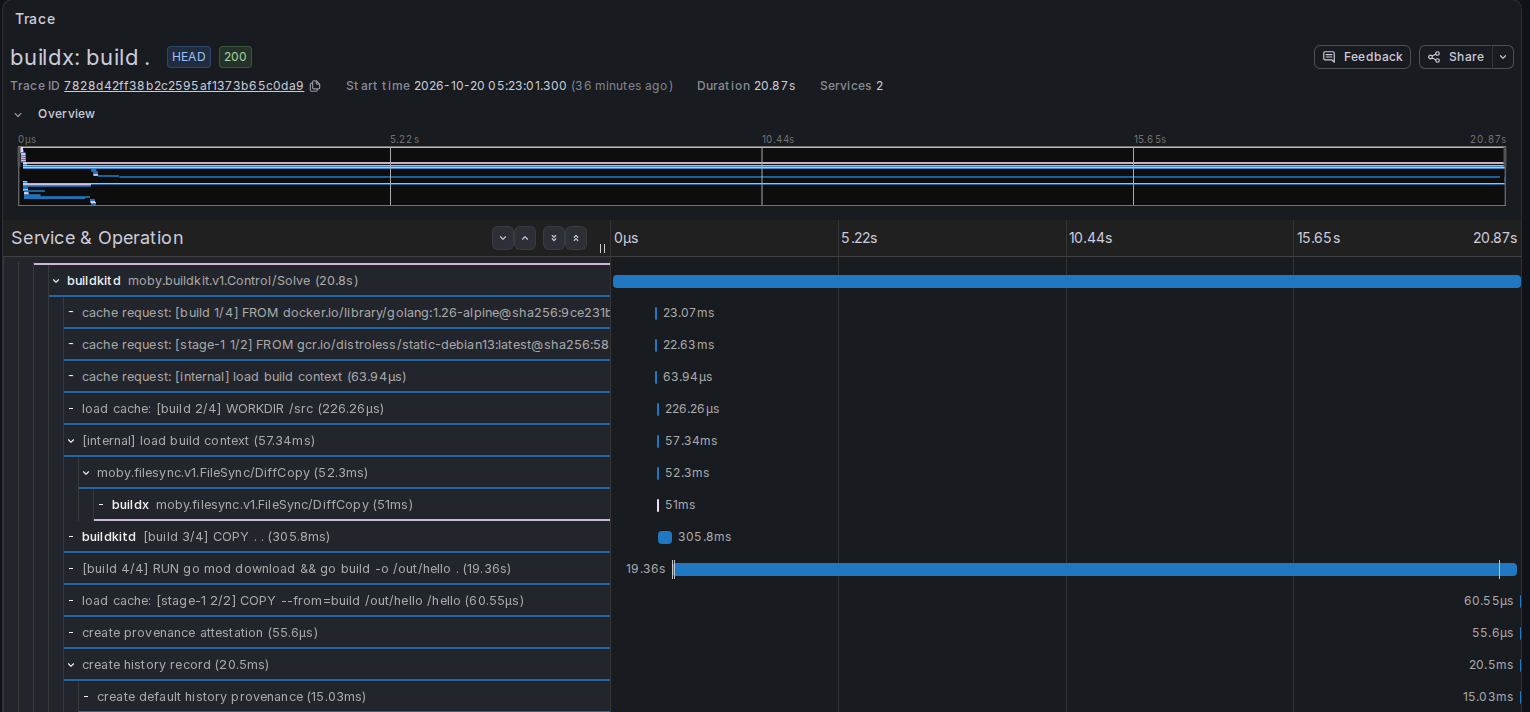 The same type of build in Grafana Explore. The top shows the trace overview; the bottom shows a crop of the Dockerfile step spans.
Make the build slower
Docker’s own UI is enough for everything so far. Tempo becomes useful when you have many builds over time, as you do in CI/CD.
The default BuildKit history settings are maxAge = 172800 (48 hours) and maxEntries = 50. Exceeding either value alone does not trigger deletion. BuildKit keeps the latest 50 records and deletes other records only if they exceed 48 hours5. The docker buildx history trace command can open only builds that remain in this history. The same limit applies when you compare two builds with --compare.
On an ephemeral CI runner, the builder and its history disappear when the job ends. Docker can save build records as ZIP artifacts in GitHub Actions. You can import them into Docker Desktop, but you view one CI run at a time. To find the commit where builds became slower, you need to retrieve and compare dozens of builds.
I made a series of commits, built each one, and stored all the traces in Tempo. The application is a small Go HTTP server that depends on the Prometheus client library. Initially, the Dockerfile used cache mounts to reuse downloaded dependencies and the build cache.
FROM golang:1.26-alpine AS build
WORKDIR /src
COPY go.mod go.sum ./
RUN --mount=type=cache,target=/go/pkg/mod \
    go mod download
COPY . .
RUN --mount=type=cache,target=/go/pkg/mod \
    --mount=type=cache,target=/root/.cache/go-build \
    go build -o /out/hello .

FROM gcr.io/distroless/static-debian13
COPY --from=build /out/hello /hello
ENTRYPOINT ["/hello"]
Partway through, I committed a Dockerfile “cleanup” that deliberately removed the cache mounts. I also moved COPY . . before the dependency download. With this order, changing one line of source triggers another dependency download and compilation of every package. The build stage became:
FROM golang:1.26-alpine AS build
WORKDIR /src
COPY . .
RUN go mod download && go build -o /out/hello .
Before and after that commit, I added one commit that only added a Dockerfile label. This left three Dockerfile changes in git log. The log alone would not tell the agent which one slowed the build; it needed the traces.
I attached the current commit ID to each build. buildx reads OTEL_RESOURCE_ATTRIBUTES, so I passed the ID as the vcs.ref.head.revision resource attribute. This attribute appears only on the buildx spans, not the buildkitd spans.
OTEL_RESOURCE_ATTRIBUTES="vcs.ref.head.revision=$(git rev-parse --short HEAD)" \
  docker buildx build --builder gf-demo .
I graphed the build durations with a TraceQL metrics query. It selects only root spans and takes the maximum duration in each 30-second interval6.
{ resource.service.name = "buildx" && span:parentID = "" } | max_over_time(duration)
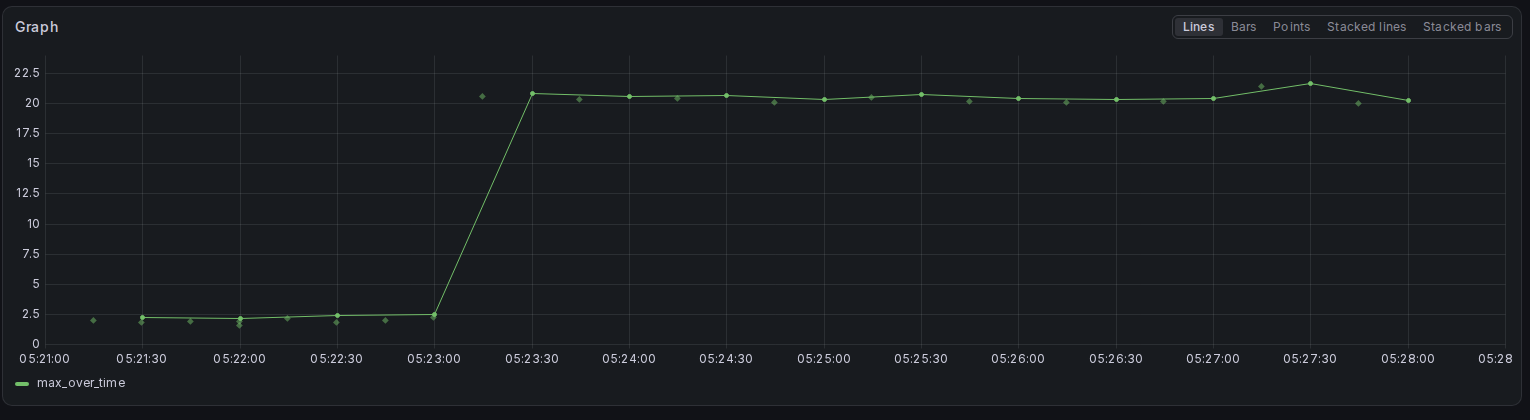 Build durations plotted in Grafana with TraceQL’s max_over_time. Each point marks the end of a 30-second interval.
The traces show durations of 1.9–2.5 seconds before I removed the cache mounts. Afterward, builds took 20.3–21.7 seconds and stayed slow7. Open a trace just after the increase, and vcs.ref.head.revision identifies its commit. In this demo, it was the “cleanup” commit. Comparing traces from before and after the change shows which step took longer.
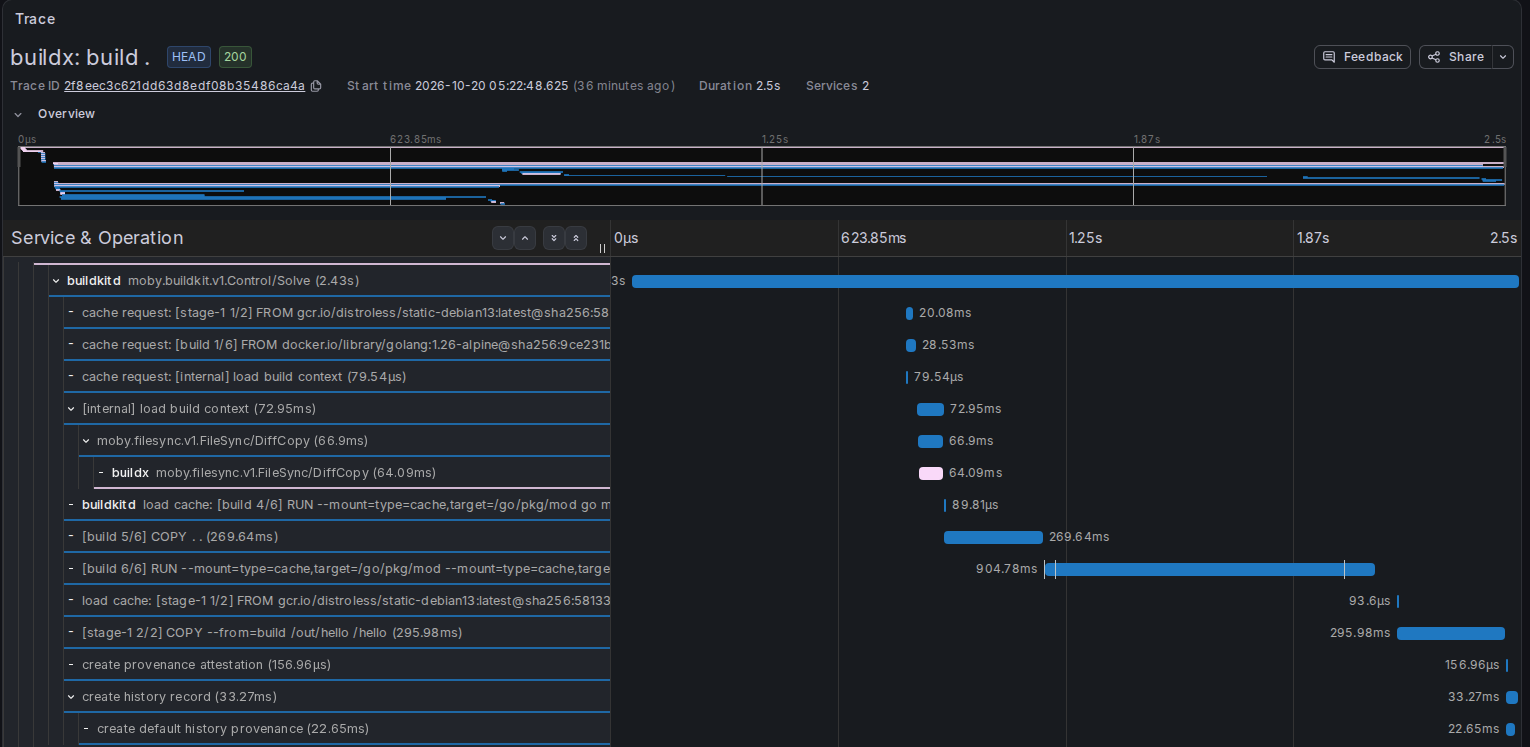 A build before the slowdown in Grafana Explore. The dependency download uses the cache, and go build finishes in about 0.9 seconds.
Before the change, the dependency download span starts with load cache:, which shows that the step used the cache. After the change, RUN go mod download && go build combines the work into one step. That step alone takes 19.36 seconds.
Step span names contain the full RUN command, so changing the Dockerfile can change those names. Use the root span duration to compare the builds before and after a change in one time series.
Ask an agent to fix it
Programs can query the traces in Tempo too. mcp-grafana exposes Grafana through an MCP server. It provides these tools for Tempo:
search_tempo_traces: search for traces with TraceQLquery_tempo_metrics: compute TraceQL metricsdiff_tempo_traces: compare two traces
I connected this server to a coding agent and asked it to investigate the slowdown. See the mcp-grafana documentation for startup instructions and MCP client configuration. For investigations, you can remove the write tools with --disable-write.
I used Claude Code, though other coding agents that support MCP servers, such as Codex, should also work. Allow the tools that the agent needs, including Git history access and docker buildx build. Here is the prompt, translated from Japanese:
Container builds have become slower recently. I send build traces to Tempo, with Grafana data source UID "tempo". Each build has a span named "build ." in service buildx. Its resource attribute vcs.ref.head.revision contains the commit ID for that build. Use the Tempo traces to find which commit slowed the build and why. Fix the Dockerfile in this directory. Then rebuild with:

    docker buildx build --builder gf-demo --output type=cacheonly .

Verify in Tempo that the new build is faster. New traces can take 1 to 2 minutes to become searchable.
The agent first read the Git history and used search_tempo_traces to list durations by commit. It identified the “cleanup” commit as the point where build duration jumped from about 2 seconds to about 21 seconds. With diff_tempo_traces, it compared traces from before and after the slowdown. It confirmed that RUN go mod download && go build now took about 19.9 seconds, whereas the earlier dependency download used the cache.
The agent restored the cache mounts and the order that copies go.mod and go.sum first. It preserved the labels that later commits added. After the rebuild, it waited for the new trace to become searchable and confirmed a duration of 2.31 seconds in Tempo. The whole process took about 3 minutes, including about 90 seconds of waiting for the new trace.
Why send traces to an observability SaaS
So far, the traces went to a local otel-lgtm container. The image targets development, demos, and testing; deleting the container also deletes its traces. To investigate across builds, you need somewhere to retain traces and accept them from CI runners. An observability SaaS such as Grafana Cloud provides that storage without requiring you to operate it. Grafana Cloud retains traces for a period that depends on your plan8.
To send traces to Grafana Cloud, change the environment variables that you pass to the builder. The Grafana Cloud OTLP gateway accepts OTLP/HTTP, so switch from BuildKit’s default gRPC to http/protobuf. I used the endpoint and authentication header values from the OpenTelemetry tile in the Grafana Cloud portal.
docker buildx create --name gf-cloud --driver docker-container \
  --driver-opt image=moby/buildkit:v0.33.1 \
  --driver-opt env.OTEL_TRACES_EXPORTER=otlp \
  --driver-opt env.OTEL_EXPORTER_OTLP_TRACES_PROTOCOL=http/protobuf \
  --driver-opt "env.OTEL_EXPORTER_OTLP_TRACES_ENDPOINT=${OTEL_EXPORTER_OTLP_ENDPOINT}/v1/traces" \
  --driver-opt "env.OTEL_EXPORTER_OTLP_TRACES_HEADERS=${OTEL_EXPORTER_OTLP_HEADERS}" \
  --bootstrap
I passed only trace-specific variables, whose names contain TRACES, because BuildKit also starts exporting metrics when it sees OTEL_EXPORTER_OTLP_ENDPOINT9. I ran the same 20 builds with this builder. All 21 traces, including an extra smoke test, reached Tempo in Grafana Cloud10. The token remains in the builder container’s environment and the buildx configuration file. Remove the builder with docker buildx rm gf-cloud when you finish.
Ask Grafana Assistant to investigate
The SaaS also includes tools to investigate the stored traces. One example is Grafana Assistant, the AI assistant in Grafana Cloud. According to its documentation, Assistant can query data sources, including Tempo, and write and execute TraceQL queries. Give it a trace ID, and it can display that trace as a waterfall. An experimental feature can also find candidate traces to compare with a given trace.
The coding agent required me to start mcp-grafana and register it with the agent. Assistant already connects to the stack’s data sources, so it needs no such setup. Someone who notices a slowdown can ask, “When did build durations increase?” directly in Grafana. Assistant can investigate the cause, while a coding agent with repository access can edit the Dockerfile and rebuild.
I asked Assistant about the 20 builds that I sent to Grafana Cloud. You can use Assistant from Grafana’s UI or its gcx command-line tool; I used gcx. I gave it the same context as the coding agent. Here is the translated prompt:
gcx assistant prompt 'Container builds have become slower recently. I send build traces to Tempo, in data source grafanacloud-shophub-traces. Each build has a span named "build ." in service buildx. Its resource attribute vcs.ref.head.revision contains the commit ID for that build. Look at traces from the past hour. Find when build durations increased, which commit was the first slow one, and which build step became slower.'
Assistant made 17 data source queries and returned an answer in 132 seconds. Its opening, translated from Japanese, was:
Conclusion: Build duration increased from about 2 seconds to about 20 seconds around 07:09 UTC. The first slow commit was
9eac8b9. The slower Dockerfile step wasRUN go mod download && go build -o /out/hello ..
The commit 9eac8b9 was the “cleanup” commit, so the answer was correct. Assistant also compared the fast build’s six steps with the slow build’s four steps. It reported that RUN go mod download && go build took about 19.4 seconds, or about 95% of the total. It inferred that dependency caching stopped working, but qualified its answer: “This data does not contain the parent-child order of commits.” It identified the first slow commit by build time. Assistant also separated the 30.2-second smoke test from the other builds because it lacked a commit attribute.
You can also connect a self-managed Grafana instance to Grafana Assistant in Grafana Cloud11.
Next steps
Docker already produces build traces and provides a UI to inspect them. That UI is enough for a single build. Tempo becomes useful when you need to investigate across builds.
I kept this article to sending build traces to Grafana and asking AI tools to investigate them. I plan to cover CI configuration next. If a CI job passes TRACEPARENT, the build spans should nest under the job span. That would let you see the build within the full pipeline.
If your builds feel slow, start by adding the two environment variables to a local builder and collecting traces. Container builds can benefit from observability too.
When standard output was not a terminal, the command wrote the trace as Jaeger-format JSON to standard output instead of starting Jaeger UI. ↩︎
I tested only Docker Engine on Linux. Docker Desktop handles
network=hostdifferently, so this configuration might not reach the endpoint there. ↩︎buildx uses the
TRACEPARENTenvironment variable as its parent trace context. If your shell sets this variable, the build joins that parent’s trace, andbuild .is no longer a root span. UnsetTRACEPARENTbefore running the build if you want a separate trace for each build. buildx v0.29.1 imports BuildKit v0.25.0’sutil/tracing/envpackage incmd/buildx/tracing.go. That package readsTRACEPARENTandTRACESTATE. Newer buildx versions useutil/tracing/childprocessfor the same purpose. ↩︎buildx v0.29.1 sets
client.WithTracerDelegatewhen it connects to BuildKit (seedriver/manager.go). buildx passes its spans to BuildKit, which exports them together. The BuildKit README also explains thatbuildctlforwards spans tobuildkitd, so only the daemon needs an exporter configuration. With the docker-container driver, each build also produces a separate trace namedbuildctl dial-stdio. Filter onresource.service.name = "buildx"to keep those traces out of your search results. ↩︎BuildKit v0.33.1’s
Queue.gcexcludes pinned records and sorts the rest from newest to oldest. It keeps the latest 50, then deletes remaining records only if more than 48 hours have passed since completion. This GC does not delete pinned records. You can change the retention settings. ↩︎With
quantile_over_time(duration, .5), a build of about 20 seconds appears as 24.3 seconds with a 60-second interval. A 30-second interval gives 34.4 seconds. This function approximates durations with power-of-two histogram buckets, which shifts the result toward bucket boundaries.max_over_timereturns the actual maximum duration among the traces in the interval. ↩︎The initial build took 38.1 seconds because the cache was empty. I excluded it from the graph’s time range. ↩︎
The Grafana Cloud pricing page lists 14 days of trace retention for Free and 30 days for Pro. You can send builds from your development machine and CI to the same Tempo instance and compare them with the same queries. ↩︎
BuildKit v0.33.1’s
util/tracing/detect/otlp.gocreates the OTLP client without options. The OpenTelemetry Go exporter reads the endpoint, protocol, and headers from environment variables. ↩︎In Grafana Cloud’s Tempo, filtering on
name = "build ."reliably finds the build traces. ↩︎According to the Grafana Assistant introduction, chat, dashboard creation, queries, and navigation also work from a self-managed Grafana instance. Investigations, which examines multiple data sources and produces reports, and access to Grafana Cloud’s MCP are available only in Grafana Cloud. ↩︎